Weather Widgets - Live Weather
- 4.3
- Rating
- 1.00M
- Installs
- Free
- Price
 Analysis by App-foxy
I usually judge a weather app by what happens after the first few days. A lively design or a clever widget can win me over immediately, but the real test is whether I still trust it when I am rushing out for work, planning a walk, checking a school run, or deciding whether laundry can stay outside. Weather Widgets - Live Weather is built around that everyday habit. It is a free weather app from Prometheus Interactive LLC, focused on forecasts, widgets, and radar rather than trying to become a general-purpose travel or lifestyle tool.
My first impression was that the app makes weather information easier to keep within reach. Instead of opening a forecast only when I remember to do so, I can use the home-screen presentation as a quick prompt. That difference sounds small, but it changes how useful a weather service feels. The app is currently at version 6.5.6, supports Android 8.0 and newer, and is rated for Everyone, so it is accessible to a broad range of users.
What feels useful after the first week
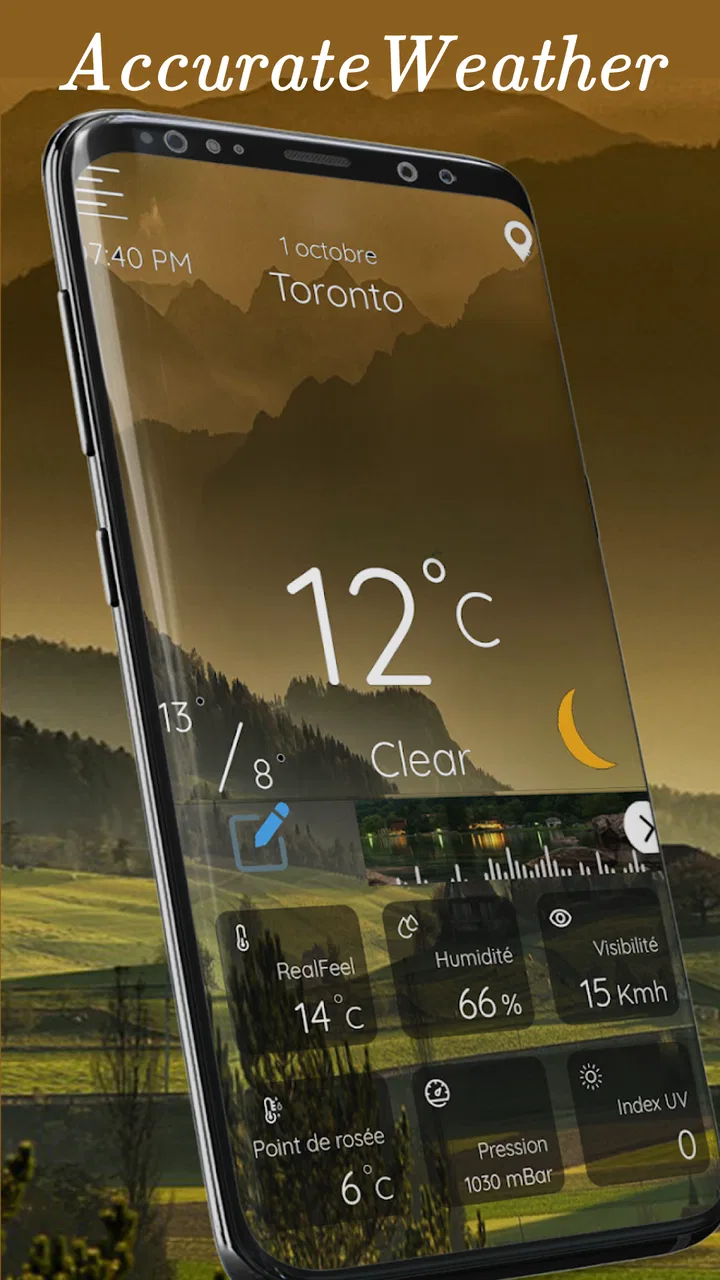
The strongest early appeal is the combination of weather widgets and radar. A traditional weather app often asks me to open it, wait for the screen to load, and then interpret several layers of information. A widget removes some of that friction. I can glance at the forecast while checking messages or arranging my day, then open the full app only when I need a closer look.
You May Also Like

 Blood Strike: 2.5 Anniversary
Blood Strike’s Loadouts Turn Every Drop Into a Tactical Gamble
A close look at Blood Strike’s custom loadouts: how fast access to signature weapons reshapes its battle royale rhythm, rewards preparation, and narrows the gap between fights.

 Pandora - Music & Podcasts
Pandora’s Music Is Easy to Start, but Harder to Recover
Pandora’s strength is its low-effort path from a seed to a station. Its weak spot is how much confidence it asks you to place in connection, setup, and quiet recovery.

 8 Ball Pool
 Is Built on Rivalries, Rematches, and Routine
A close look at the rivalries, rematches, shared routines, and unanswered safety questions that turn a quick pool match into a persistent mobile community.

 Samsung Music
’s Quiet Strength Is Playing What You Already Own
Its reach comes less from spectacle than from dependable access to a personal library. That simplicity is both the app’s strongest retention engine and its ceiling.

 AccuWeather: Weather Radar
AccuWeather Review: A Quick, Clear Forecast for Everyday Decisions
For everyday plans, the best forecast is the one you can understand quickly. AccuWeather makes rain timing, radar, and local conditions easy to act on, with a few trade-offs.

 Hill Climb Racing
Why Hill Climb Racing Still Turns Crashes Into One More Run
A tiny car, a bumpy hill and one more upgrade: Hill Climb Racing keeps resurfacing because its simple chaos makes every near-miss feel personal.
More From Our News Desk



That is particularly helpful on mornings when the forecast is uncertain. I might check whether a light jacket is enough, whether rain is likely during a commute, or whether an outdoor appointment needs a backup plan. The widget is not a substitute for careful planning, but it makes the first decision faster. In my experience, this is where the app feels more practical than a weather service that is accurate but hidden behind several taps.
The radar view adds another layer of usefulness. A daily forecast can tell me that rain is expected, but radar helps me understand whether weather is approaching, passing nearby, or already moving away. I found that distinction more valuable than simply reading a percentage. For a short trip across town, the timing and movement of a weather system can matter more than the general label attached to the day.
During the first week, I would recommend setting up the app around the information I actually check. If I only need a quick morning glance, a compact widget may be less distracting than a large display. If I regularly make decisions around changing conditions, a more visible widget and occasional radar checks make more sense. The important point is not to fill the home screen with weather information just because the app makes that possible. The benefit comes from choosing a layout that supports a real routine.
The visual side also contributes to the first-week appeal. The presentation is designed to feel pleasant rather than purely technical, which makes the widget easier to live with than a block of numbers. That said, attractive weather graphics should remain secondary to readability. I would place the widget somewhere I can read it quickly, not somewhere its appearance competes with the apps I use more often.
The app has attracted over a million installs and holds a 4.3 average from around forty-two thousand ratings. Those figures suggest that the basic idea has connected with a substantial audience, but they do not remove the need to judge it personally. Weather preferences are unusually individual. Some people want a calm, glanceable display; others want a dense forecast with every possible detail. This app is more appealing to the first group, especially when widgets are central to the decision.
A realistic daily scenario
Imagine that I have a morning appointment, a walk planned for the afternoon, and no interest in checking a forecast repeatedly. I can glance at the widget before leaving, then use radar shortly before the walk if the sky looks uncertain. If a rain band appears to be moving toward my area, I can change the timing instead of reacting after I am already outside. That workflow is simple, but it is more useful than opening an app once and assuming the forecast will remain unchanged all day.
For families, the same routine can help with practical choices such as clothing, outdoor play, or errands. For commuters, the value is less about predicting every minute and more about noticing when conditions deserve a second look. For casual users, the app may be enough as a convenient glance at the day. For people who need highly specialized meteorological information, however, its friendly format may feel too limited compared with a service designed for professional or enthusiast-level analysis.
Why it can keep earning a place month after month
Weather is one of the few app categories with a genuinely recurring reason to return. I do not need to invent a reason to open it; the conditions outside create one. That gives Weather Widgets - Live Weather a better chance of lasting than an app whose appeal depends entirely on novelty. The widget can become part of a morning routine, while radar remains useful when the forecast becomes uncertain.
The recurring value comes from reducing small decisions. Should I carry an umbrella? Is a longer trip sensible today? Will the temperature change enough to affect an evening plan? None of these questions requires an elaborate research session, but answering them reliably saves time and avoids inconvenience. The app works best when it sits between a quick glance and a deeper check, rather than forcing me to choose only one level of detail.
I also like that the app can serve different levels of attention. On an ordinary day, I can use the widget and move on. When weather becomes important, I can open the app and look at radar. This two-speed workflow is one of its more durable strengths. A weather app that always presents too much information becomes tiring, while one that shows only a single temperature becomes inadequate as soon as conditions change.
Still, long-term value depends on trust. No weather app can make uncertain conditions perfectly predictable, and I would not use this one as the sole basis for safety-critical decisions. For ordinary planning, it is useful to compare the visible forecast with what is happening outside and to check again when conditions are changing quickly. That habit prevents the common mistake of treating an earlier forecast as a guarantee.
The free entry point is another reason the app is easy to keep around. I can try the core experience without committing money at the start. There are in-app purchases ranging from $0.99 to $99.99 per item, so I would pay attention to what is offered before buying anything. The right question is whether a paid option solves a problem I actually have, not whether it makes the app feel more complete simply because it is available.
For someone who already has a dependable weather app built into a phone, the decision is more subtle. Weather Widgets - Live Weather earns space when its widget and radar workflow is more convenient than the existing option. If the built-in service already gives a clear widget, useful radar, and a layout I like, installing another app may add clutter without adding much daily value. The app is not automatically better than every default tool; its advantage is the way it brings these particular elements together.
Who benefits most from the widget-first approach
I think the app is a good fit for people who make frequent small plans around the weather. That includes commuters, walkers, cyclists, parents organizing outdoor time, and anyone who dislikes opening a full forecast for a simple answer. It is also suitable for users who appreciate a more attractive home-screen view and want radar available when a quick forecast is not enough.
I would be more cautious about recommending it to someone who wants a highly technical weather workspace. If your priority is specialized observations, advanced atmospheric detail, or a professional forecasting workflow, a dedicated meteorological service may be a better match. Likewise, if you rarely check the weather and do not use home-screen widgets, the app may offer more visual presence than practical benefit.
Maintenance, friction, and the risk of fatigue
The maintenance burden is not dramatic, but it is easy to underestimate. A widget has to remain readable, useful, and well placed. If I change my home-screen layout, the widget can become less convenient. If I add too many widgets, the weather display starts competing for attention. The best setup is usually the one I stop noticing until I need it.
There is also a difference between maintaining the app and maintaining the habit. Installing it is simple; deciding how often to check it is where discipline matters. I would avoid repeatedly refreshing the forecast out of anxiety, especially when the day is mostly settled. A quick morning glance and a radar check before an important outdoor plan are often enough. More checking does not automatically create better decisions.
Visual fatigue is another possible issue. Weather widgets are designed to be noticed, but a display that is too decorative or prominent can make the home screen feel busy. I would test the widget for several days rather than judging it only during setup. If I find myself ignoring it because it blends into the background, I would adjust its position or size. If I find myself checking it constantly without gaining useful information, I would make it smaller or remove it.
Forecast fatigue can also come from uncertainty. When the forecast changes during the day, a user may blame the app even though changing conditions are part of weather itself. I found it more productive to treat the forecast as guidance and radar as context. The widget answers “what should I expect?” while radar helps answer “what appears to be happening nearby right now?” Keeping those roles separate makes the app feel less frustrating.
Another trade-off is the presence of optional purchases. The free version makes experimentation easy, but users who want the complete experience may encounter paid choices. I would not describe that as a reason to avoid the app, yet it does affect the long-term decision. Before purchasing, I would use the free setup through different kinds of days and ask whether the missing capability affects my routine or merely satisfies curiosity.
Privacy and battery expectations are also worth considering in practical terms, even without turning them into a technical checklist. Any app that keeps information visible through widgets has to fit comfortably into the way I use my phone. If the widget becomes inconvenient, visually distracting, or unnecessary, its presence is no longer a benefit. I would keep only the elements that save me time and remove anything that turns a simple forecast into another source of phone maintenance.
Three habits that make the app more useful
I would use the widget for routine awareness and reserve radar for decisions where timing matters. This prevents the home screen from becoming overloaded while still taking advantage of the app’s deeper view.
I would check the forecast at the point of commitment, not only at the start of the day. Before leaving for a long walk or outdoor appointment, a fresh radar look can be more useful than relying on an old morning glance.
I would judge the app over changing conditions rather than only pleasant weather. A sunny day tests appearance; a mixed day tests whether the widget and radar actually help me adapt plans.
These habits reveal a useful trade-off: the app is strongest when it reduces friction, but it can become less helpful if I turn every forecast detail into a reason to monitor the phone. Its lasting value comes from better timing and awareness, not from constant attention.
My long-term verdict
After the novelty fades, Weather Widgets - Live Weather still has a credible reason to remain installed. The combination of a glanceable home-screen presence and radar gives it more practical depth than a simple temperature display. I can imagine keeping it for months if the widget fits naturally into my layout and the forecast presentation remains easy to read.
Its main limitation is not that it lacks a purpose, but that its purpose may overlap with tools I already have. Users with a satisfactory built-in weather widget may not notice enough improvement to justify another app. People looking for technical depth may also prefer a more specialized alternative. This is a focused weather companion, not an answer to every possible forecasting need.
The app is free to start, available to Everyone, and maintained by Prometheus Interactive LLC, with the current version listed as 6.5.6. Its broad adoption and 4.3 average are encouraging, but my recommendation rests more on the daily workflow than on popularity. I would install it if I wanted weather information visible without repeatedly opening an app, especially if radar is important to my outdoor planning.
My recommendation is to try it with a deliberately modest setup. Add one useful widget, use it through a week with changing plans, and see whether it genuinely saves time. If it becomes part of a natural morning and pre-outing routine, it has earned its place. If I keep opening the old weather service instead, or if the widget becomes background decoration, I would remove it without hesitation. That is the fair test: not whether it looks appealing on day one, but whether it continues to help when checking the weather becomes an ordinary habit.
For me, the lasting appeal is real but specific. This is a good choice for quick awareness, attractive widgets, and a practical radar fallback. It is less compelling for users who want advanced weather analysis or already have an equally convenient setup. Used with restraint, it can turn weather checking into a small, useful part of the day rather than another app demanding attention.
FAQs for Weather Widgets - Live Weather
01What is Weather Widgets - Live Weather, and what does it offer?
Weather Widgets - Live Weather is a weather application designed to provide current conditions, forecasts, and useful information directly on your Android or iOS device. After exploring the app, its main appeal is the collection of customizable widgets, which can display temperature, rain chances, wind, humidity, and other details on the home screen without requiring users to open the full application every time.
02How accurate are the forecasts in Weather Widgets - Live Weather?
Forecast accuracy depends on the weather data provider, your location, and how quickly local conditions change. In testing, the app is useful for checking general conditions, hourly trends, and upcoming forecasts, but it should not be treated as a perfect prediction. Users should also remember that severe-weather information can change quickly and should be confirmed through official local alerts when safety is involved.
03Can I customize the weather widgets and notifications?
The application generally allows users to choose from different widget styles, sizes, layouts, and information displays, depending on the device and operating system. You can usually select whether to show temperature, forecast icons, precipitation, or other details. Notification options may also be available for daily updates or weather changes, although the exact customization tools can vary between app versions and subscription levels.
04Does Weather Widgets - Live Weather require location access?
Location permission is useful if you want the app to automatically show weather for your current position, especially while traveling or moving between areas. However, many weather apps also let you add cities manually and use those locations without continuous GPS access. Before granting permission, review the available settings and choose the least intrusive option that still provides the forecasts and widgets you actually need.
05Is Weather Widgets - Live Weather free to use?
The app can typically be downloaded and used with free features, but some advanced widgets, premium designs, extended forecasts, or an ad-free experience may require in-app purchases or a subscription. Before downloading, check the current store listing for pricing, trial conditions, and renewal details. If you only need basic weather information, the free version may be sufficient, while frequent users may prefer the additional customization offered by premium options.
Pros
- Multiple widget sizes fit different home-screen layouts.
- Quick access to forecasts without opening the full app.
- Useful weather details include temperature
- wind
- and humidity.
- Live updates help keep current conditions visible throughout the day.
- Simple interface makes the main forecast easy to understand.
Cons
- Some advanced features may require a premium subscription.
- Frequent updates can affect battery life on certain devices.
- Widget accuracy depends on location access and weather data sources.
- Ads may reduce the experience for users on the free version.
- Limited customization may disappoint users seeking highly detailed designs.

Weather Widgets - Live Weather
Gallery